
Article: OXVA Xlim Pro 2 vs Xlim Pro 3: What’s Changed?
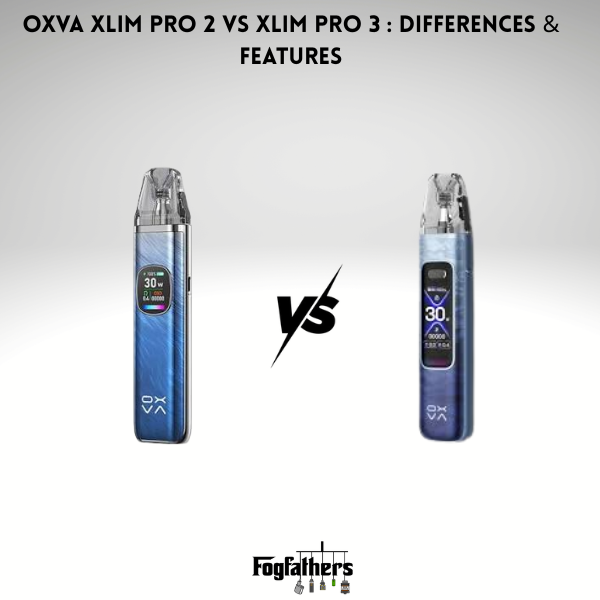
OXVA Xlim Pro 2 vs Xlim Pro 3: What’s Changed?
The OXVA Xlim Pro 2 was one of the most popular pod kits in the UK. The Xlim Pro 3 is its follow-up. On paper, they look similar. Both have a 5 to 30W range, both are easy to use, and both are built for mouth-to-lung (MTL) and restricted direct-to-lung (RDL) vaping. That has left many vapers asking whether the newer model is worth the extra money, or whether the Pro 2 is still good enough. The answer depends on what you value most, and a few of the changes are bigger than they first look.
So what actually changed? Here are the facts, without the fluff.
The Short Answer
The Pro 3 is a refinement, not a reinvention. You get a bigger battery, a larger screen and a newer chipset. The pods, wattage range and basic use stay the same.
If you already own a Pro 2 and it works well, you do not need to rush. If you are buying new, the Pro 3 is the better pick, as long as the price gap is small.
What Changed: The Key Upgrades
1. Bigger Battery
- Pro 2: 1300mAh
- Pro 3: 1500mAh
That is about 15% more capacity. In real life, it means you charge a little less often. One UK retailer rates the Pro 3 at around five days of typical use against four for the Pro 2. Your own results will depend on how much you vape and what wattage you use.
Both charge by USB-C at 2A. OXVA rates the Pro 3 at 80% in about 30 minutes, and the Pro 2 is only slightly slower.
2. Bigger, Sharper Screen
- Pro 2: 0.56-inch colour screen
- Pro 3: 1.05-inch HD colour screen
This is the change you will notice first. The Pro 3 screen is much larger, so wattage, battery level and pod resistance are easy to read at a glance. The Pro 2 screen is still clear, but it is small.
3. Newer Chipset
The Pro 2 uses OXVA’s X-TREME chipset. UK retailers list the Pro 3 with a newer Photon chipset, which reads the resistance of your pod and sets a safe wattage automatically. The aim is steadier flavour as the battery drains, and some sellers also claim better leak resistance. Treat these as the brand’s claims. The difference in flavour is subtle, and most people will notice the battery and screen first.
4. Pod Capacity: Check Your Region
Some reviews mention new 3ml pods for the Pro 3. In the UK, the Pro 3 is sold with a 2ml pod because of local rules, and reviews note it as “3ml (2ml TPD)”. So do not expect extra liquid capacity here.
5. Slightly Larger Body
The Pro 3 measures about 119.5 x 25.7 x 15mm and weighs around 77g, so it is a touch bigger than older Xlim kits. It still fits in a pocket easily.
What Stayed the Same
- Power range: Both run 5 to 30W, so your favourite wattage carries over. Lower settings save battery, higher ones give a warmer, stronger hit.
- Vaping style: Both suit MTL and RDL, making them a good fit for nic salts and anyone moving away from smoking.
- Activation: Both work by drawing or by pressing the button, so you can pick whichever feels better.
- Airflow: Both have adjustable airflow, so you can go tighter for MTL or airier for more vapour.
- Filling: Both use top-fill pods, so you can refill without removing the pod.
- Pods: Both use the Xlim pod family, so spare pods should fit either device. Check the pod name before buying.
That last point matters most. Both kits use Xlim pods, so you are not locked into anything new. If you have spare pods from your Pro 2, they should fit the Pro 3. Always double-check the pod type on the product page before you buy.
Side-by-Side Table
| Feature | Xlim Pro 2 | Xlim Pro 3 |
|---|---|---|
| Battery | 1300mAh | 1500mAh |
| Screen | 0.56" colour | 1.05" HD colour |
| Wattage | 5 to 30W | 5 to 30W |
| Chipset | X-TREME | Photon |
| Charging | USB-C, 2A | USB-C, 2A (80% in about 30 mins) |
| Pod size (UK) | 2ml | 2ml |
| Pods | Xlim family | Xlim family |
| Vaping style | MTL / RDL | MTL / RDL |
| Activation | Draw and button | Draw and button |
How the Pro 3 Controls Work
The Pro 3 uses one fire button with simple click shortcuts:
- 5 clicks: Turns the device on or off, which stops accidental firing in your pocket.
- 3 clicks: Steps through the wattage. Start low and go up only if the hit feels weak.
- 2 clicks: Opens the menu, where you can change the screen theme, LED colour and puff counter.
- 4 clicks: Locks or unlocks the fire button. If the device seems dead, check this first.
If you are coming from a Pro 2, it will feel familiar. Just learn the menu shortcuts, and you are set.
Which Pods Work With Both?
Both devices work with Xlim pods, including the 0.6 ohm and 0.8 ohm options. A quick guide:
- 0.6 ohm: more vapour, a warmer hit, a bit more battery use. Often chosen for RDL-style vaping.
- 0.8 ohm: tighter draw, a more cigarette-like feel, and longer battery life. Often chosen for MTL.
Pair either with a good nic salt or 50/50 e-liquid for best results. Thick, high-VG juice can struggle in small pods, so stick with liquids made for pod kits. You can also browse by strength, like 10mg or 20mg. If you are not sure which type to pick, our guide on salts vs regular juice explains the difference.
Should You Upgrade From the Pro 2?
Stay with your Pro 2 if:
- It works fine and the battery lasts you a full day
- You do not mind the smaller screen
- You would rather spend the money on pods and e-liquid
Upgrade to the Pro 3 if:
- You want a bigger battery and fewer charges
- You like seeing clear numbers on a bigger screen
- Your Pro 2 battery is getting weak, or the device has seen better days
Should a New Buyer Choose the Pro 3?
Yes, in most cases. The Pro 3 is the newer model, with a better battery and screen, and it uses the same pods. Unless you find a Pro 2 at a clearly lower price, the Pro 3 is the safer choice.
One note to avoid confusion: the Xlim Pro 2 and the Xlim Pro 2 DNA are different devices. The DNA version is a separate model with its own features. Check the full product name before you buy, especially when comparing prices.
Pros and Cons of the Pro 3
Pros
- Bigger 1500mAh battery
- Large, easy-to-read screen
- Fast USB-C charging
- Same pods as earlier Xlim kits
- Adjustable wattage and airflow
Cons
- A small step up, not a huge leap
- A little larger than older Xlim models
- Real-world flavour gains over the Pro 2 are small
Quick Care Tips
- Let new pods soak for a few minutes before the first puff.
- Do not run pods dry. Refill when the liquid gets low.
- Replace pods when flavour fades. Our page on replacing your pod shows what is available.
- Match your wattage to the pod and nudge it up only if the hit feels weak.
- If you see an error, our guide on fixing E2 errors can help.
Final Thoughts
The Xlim Pro 3 keeps what people liked about the Pro 2 and improves the parts that mattered most: battery life and the screen. It is not a revolution, but it is a smart upgrade, and it works with the same pods.
If you are shopping for a new device, the Pro 3 is the better buy. If you already have a Pro 2 that works, keep using it until you need something new. Either way, FogFathers stocks a wide range of vape kits, mods, pods and e-liquids, so you can find the right setup and get vaping with confidence. You can also check out the Xlim Pro 3 kit directly.

Leave a comment
This site is protected by hCaptcha and the hCaptcha Privacy Policy and Terms of Service apply.